
How to Stop Accidental Mouse Clicks Caused by Hand Tremor
Why tremor causes accidental clicks
- A finger resting on a button can press it during a shake, opening the wrong thing or closing a window.
- Two quick presses can turn into a double-click.
- A press while the hand is moving can turn a click into a drag, moving a file or a block of text by accident.
I actually made a stock purchase by accident due to my tremor. After fine tuning your software to my needs it is as if I no longer have a tremor!!! Aaron, a day trader with essential tremor
First, rule out a worn mouse
Mouse buttons wear out, and a worn button can start double-clicking on its own. If you have a second mouse, try it. If the extra clicks stop, the old mouse was the problem.
Let only deliberate clicks through
- Open the SteadyMouse settings by double-clicking its desktop icon.
- Under Button Settings, check Ignore Accidental Clicks for each button that misfires.
- Quick presses are now ignored. To click on purpose, hold the button just a little longer.
- With Enable Visual Guide checked, an indicator next to the cursor works like a traffic light: let go when it turns green and the click counts. Presses released on yellow or red are ignored.
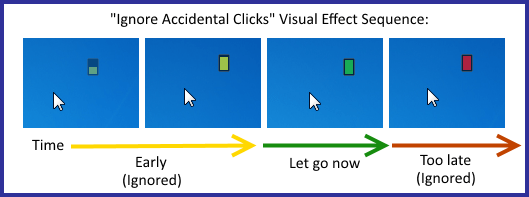
Set the hold period as short as works for you. For many people, 0.1 to 0.2 seconds is enough, so deliberate clicks barely feel different from before. The left button still double-clicks and drags: once the indicator turns green the button goes down, keep holding to drag, and two deliberate clicks in a row make a double-click.
Watch the walkthrough on YouTube, or read the Ignore Accidental Clicks section of the manual.
The shaking mouse cursor and accidental multiple double clicking had disappeared. What a relief. Albert J. Bick, CPA
Click less with Icon Targeting
SteadyMouse's Icon Targeting marks the button or icon nearest your cursor. Double-tap the trigger key and the cursor snaps onto it, and SteadyMouse can click it for you. There's no need to land right on small targets. See Icon Targeting in the manual.
Helpful Windows settings
- Use your steadier hand. If tremor is worse in one hand, you can swap the mouse buttons for the other hand: Settings > Bluetooth & devices > Mouse > Primary mouse button.
- If ClickLock is on, SteadyMouse turns it off when you use Ignore Accidental Clicks, because the two features interfere with each other.
SteadyMouse works with any mouse, trackball, or touchpad, and every purchase includes a 70-day money-back guarantee. See features and pricing, or read how to use a computer mouse with hand tremor.