
Helping a Parent with Hand Tremor Use the Computer Again
Buying it for them
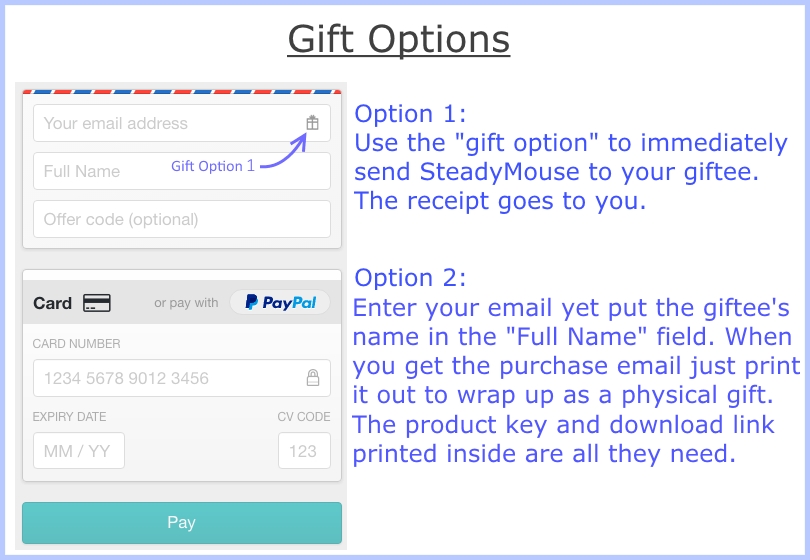
- Use the gift option at checkout and the installation instructions go straight to your parent. Or buy it yourself and pass along the product key and a link to the downloads page.
- One license covers your parent's own computers, such as a desktop and a laptop.
- Every purchase includes a 70-day money-back guarantee, so there's time to see how it works for them.
Installing it
Run the installer from the purchase email, enter the product key, and SteadyMouse opens its settings window the first time it runs. The manual walks through installation and activation with a screenshot for every step.
I bought SteadyMouse 2 two days ago for my mother, who has essential tremor. It was really easy to download, install and use. [...] I had SteadyMouse up and running in a few minutes and it immediately made a huge improvement on her ability to use the mouse. Mike G, Brick, NJ
Tuning it together
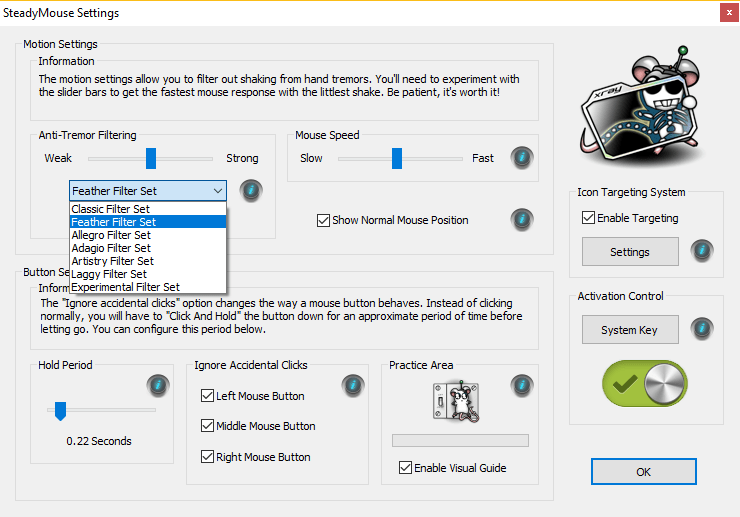
- Set the mouse speed low and the filter strength high, around 95%, so the cursor is slow but smooth.
- Try the Feather, Allegro, Adagio, and Classic filter sets, and keep the snappiest one that still removes all of the shaking.
- Lower the filter strength until the shake starts coming through, then raise it slightly.
- If your parent clicks by accident, turn on Ignore Accidental Clicks.
- Raise the mouse speed a little at a time, staying below the halfway point.
- Press Num Lock to turn SteadyMouse off when someone else uses the computer, and press it again to turn it back on.
- Hold Num Lock down for at least three seconds to open the settings window.
- Double-click the SteadyMouse desktop icon to open the settings at any time.
Helping from far away
Windows' free Quick Assist app lets you see and control your parent's screen from your own computer, with their permission. On your computer, press Ctrl + Windows key + Q and choose Help someone. Your parent opens Quick Assist, types in the code you give them, and selects Allow. If the cursor feels slow while you're in control, turn SteadyMouse off with Num Lock, and back on when you're done.
Little things that help
- A larger cursor: Settings > Accessibility > Mouse pointer and touch.
- Larger text: Settings > Accessibility > Text size.
- Zoom in on web pages: hold Ctrl and press the + key, or hold Ctrl and roll the mouse wheel.
She started playing her games and the "Darns", "Dang its", and "You stupid machine" comments have almost completely stopped. I asked her how it was working for her and she said "It's better", but trust me this is the highest praise she will give anything. Darren from Sioux Falls, SD
Questions? Email support@steadymouse.com. See features and pricing, or read how to use a computer mouse with hand tremor.